
Jellyfish Standalone Certificate Authority
Jellyfish Standalone Certificate Authority (CA) by Cogito Group is a Common Criteria and NIAP certified private CA that runs on your own infrastructure. It is operated from a Terminal User Interface (TUI) instead of a traditional graphical interface, which keeps it simple to run and light on compute and storage.
- Certified: Common Criteria and NIAP certified.
- TUI: No traditional GUI, but still driven by mouse and keyboard.
- Lightweight: Low compute and storage requirements.
- Manual and automated: Certificate creation through the TUI, ACME and Windows autoenrolment.
What is Jellyfish Standalone CA?
Jellyfish Standalone CA is a lightweight version of the same Certificate Authority product used in the wider Jellyfish capability. It keeps what a CA needs (CA creation, certificate templates, issuance and revocation, CRL publication and automated enrolment) and leaves out the wider platform, including its traditional graphical user interface.
With no GUI to install, configure and maintain, Standalone CA has a smaller attack surface, is simpler to operate and needs less compute and storage. This makes it well suited to Root CAs, to environments where simplicity matters most, and to deployments where hardware and storage requirements must be kept low.
Despite its small size, it still supports HSMs for CA key storage and smartcards for operator logon.
Key Benefits
The key benefits of Jellyfish Standalone CA include:
- Certified assurance: Common Criteria and NIAP certification provides independent evidence of the CA’s security for government, defence and other high-assurance environments.
- Smaller attack surface: With no GUI, there are fewer components to expose, patch and secure.
- Built on Jellyfish: The same Certificate Authority product used in the wider Jellyfish capability, cut down to the essentials.
- TUI: Guided forms, driven by mouse and keyboard, replace the traditional GUI, and each form shows the equivalent CLI command.
- Small footprint: Low compute and storage requirements, with file-based storage for small deployments such as Root CAs.
- Room to grow: PostgreSQL supports larger certificate volumes, multiple instances and high availability.
- Automated enrolment: ACME on Linux and Windows deployments, and autoenrolment on Windows deployments.
- Run it your way: As a single executable or as an installed platform, on Windows or Linux.
- HSMs and smartcards: CA keys can be held in a PKCS#11 HSM, such as Thales Luna, Entrust nShield or YubiHSM 2, and operators can log on with a smartcard and PIN.
- Post-quantum ready: ML-DSA CA keys are supported alongside RSA and ECDSA.
Operated from a Terminal User Interface
The Terminal User Interface (TUI) is a full-screen console that runs in a terminal window and can still be driven by mouse and keyboard. It provides the full functionality of the command line interface (CLI) through guided forms, and each form shows the equivalent CLI command, so operators can see exactly what every action does.
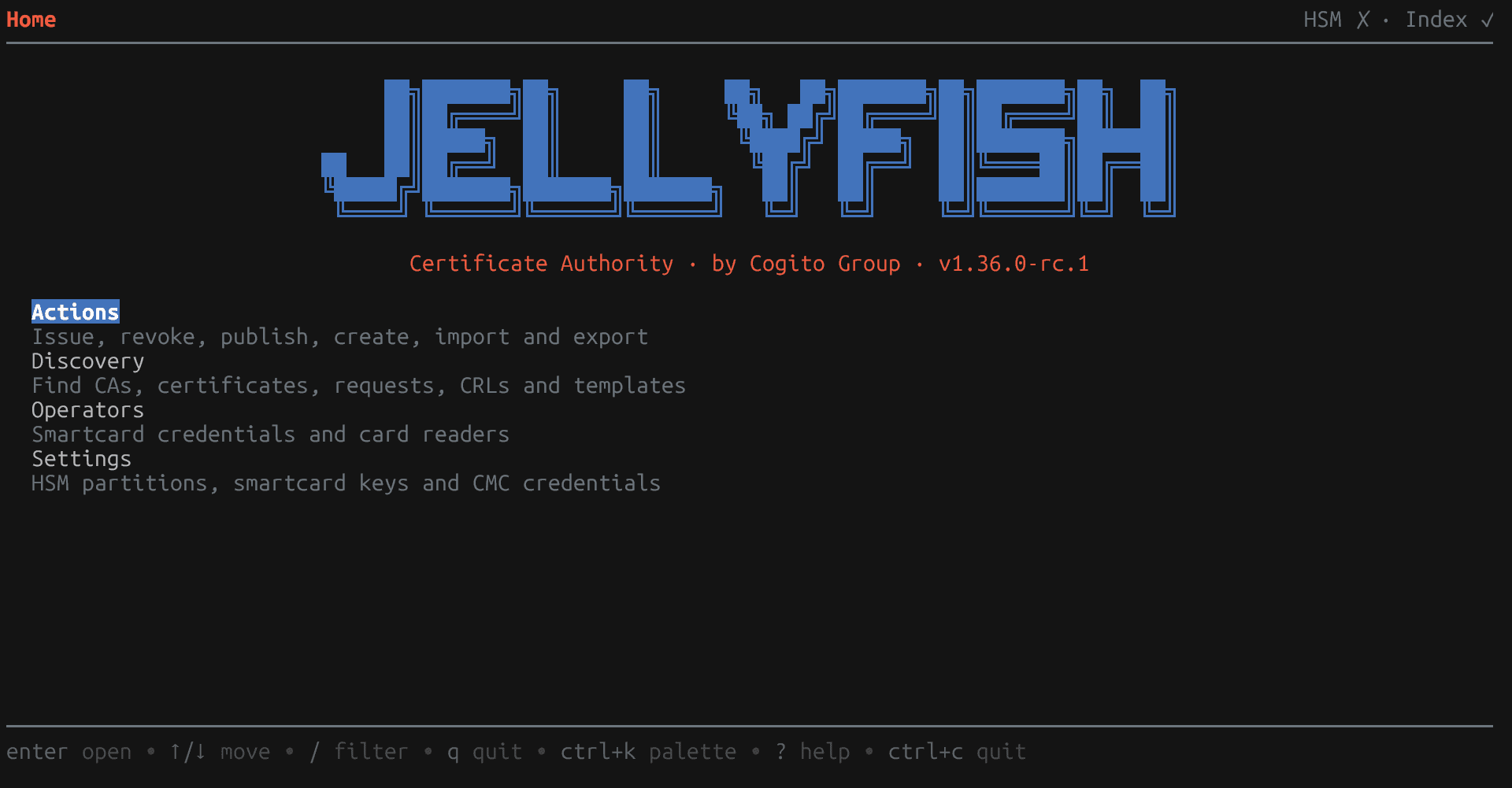
- No GUI required: Administer the CA without a browser or a graphical desktop.
- Four clear areas: Actions, Discovery, Operators and Settings, described in Step 3.
- Smartcard logon: When operator smartcards are registered, a card and PIN are required to log on.
- Search and audit: Full-text search across CAs, certificates, requests, CRLs and templates, with certificates, requests and template changes recorded in the audit trail.
Where Standalone CA fits
Standalone CA is designed for deployments where a small, focused CA is a better fit than a full platform.
- Root CAs: A Root CA issues few certificates and is often kept offline. File-based storage and the single executable keep it small enough to run on a dedicated, isolated machine.
- Simplicity first: Environments where a small, easily understood system matters more than a broad feature set.
- Low compute and storage: Sites where server, virtual machine or storage resources are limited.
- On-premises CAs: On-premises deployments with low certificate counts, where search and relationship requirements are not high.
Standalone CA or the full Jellyfish platform
Standalone CA and the full Jellyfish platform are built on the same Certificate Authority product. The difference is in what surrounds it.
Jellyfish Standalone CA | Full Jellyfish platform | |
|---|---|---|
Interface | Terminal User Interface and CLI | Traditional graphical user interface |
Footprint | Low compute and storage | Higher, to support the full platform |
Search and relationships | Full-text search across CA records | Rich search and relationships across certificates, keys, devices, users and services |
Capabilities | Certificate Authority, with ACME and Windows autoenrolment | Wider capabilities, such as key and certificate discovery, alerts and reporting |
Best suited to | Root CAs, and on-premises CAs with low certificate counts | Organisations that need to manage and relate large numbers of certificates |
Deployment options
Standalone CA can be run as an executable or as an installed platform, with file-based or PostgreSQL storage, which makes it highly versatile. These options combine to suit anything from a single offline Root CA to a highly available online CA.
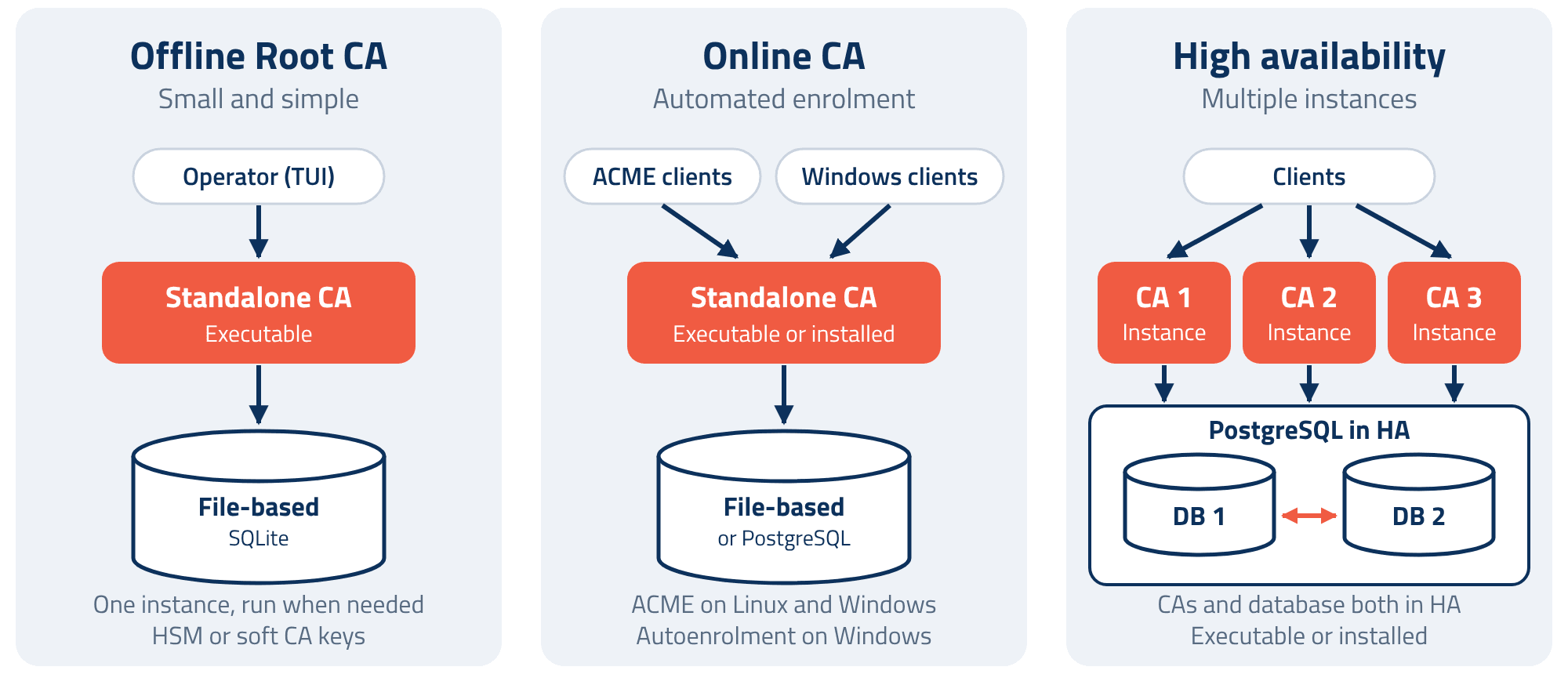
- Executable: A single file for Windows or Linux that runs without installation. Well suited to an offline Root CA that is run only when needed, for example to sign a subordinate CA or publish a CRL.
- Installed platform: Installed on a server and run as a service for always-on functions such as scheduled CRL publication, ACME and autoenrolment. On Linux, the signed Deb package installs and updates through APT, and a Docker image is also available.
- File-based storage: Data is held in a single SQLite file on disk, with no database server to run. Ideal for small Root CA deployments.
- PostgreSQL: For larger use cases, multiple instances and high availability.
High availability
High availability is supported when using PostgreSQL. Multiple instances of the executable or installed platform connect to the same PostgreSQL database, so the CA stays available if an instance goes offline. The database should be highly available too, with at least two PostgreSQL instances, so that neither the CA nor its database is a single point of failure.
Getting started in eight steps
Deployment and operation follow eight steps, from installation to automated certificate issuance.

Step 1: Installation
The Certificate Authority is distributed as a single application, available in the following formats. The executables run without installation, while the Deb package and Docker image suit installed, always-on deployments.
Format | Description |
|---|---|
Windows executable | Single .exe for Windows servers and workstations. |
Linux executable | Single binary for Linux hosts. |
Deb package | Signed package, installed and updated through APT. |
Docker | Container image from the Cogito registry. |
Step 2: Database selection
Two storage options are available, and operation is identical in both. File-based storage (SQLite) suits small deployments, such as a Root CA, of up to 100,000 certificates on a single instance. PostgreSQL is recommended for larger volumes, multiple instances and high availability.
File-based (SQLite) | PostgreSQL | |
|---|---|---|
Managed certificates | Up to 100,000 | Millions |
Data storage | Single file on disk | PostgreSQL server or cluster |
Configuration | File path | Connection string |
Instances | One | Several, sharing one database |
High availability | No | Yes |
Step 3: Operator console
The operator console is the Terminal User Interface. It is started with the command below. If operator smartcards are registered, a card and PIN are required at login.
jellyfish ui
The console is organised into four areas.
Area | Functions |
|---|---|
Actions | Issue, revoke, publish, create, import and export |
Discovery | Search CAs, certificates, requests, CRLs and templates |
Operators | Manage smartcard credentials and card readers |
Settings | Set up HSM partitions, smartcard keys and CMC credentials |
Navigation supports mouse or keyboard input.
Step 4: Key storage
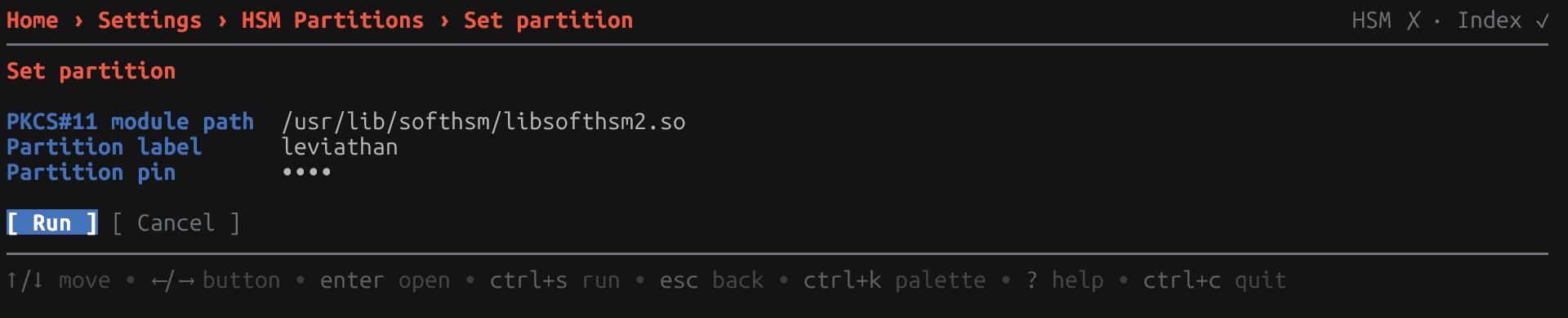
CA private keys can be held in a PKCS#11 HSM or as soft keys. HSM partitions are configured under Settings by providing the PKCS#11 module path, partition label and PIN.
Key storage | Supported options |
|---|---|
PKCS#11 HSM | Thales Luna, Entrust nShield, YubiHSM 2, SoftHSM 2 and other PKCS#11 modules |
Soft key | Encrypted in the database, or held in a local key file |
Step 5: Certificate Authority creation
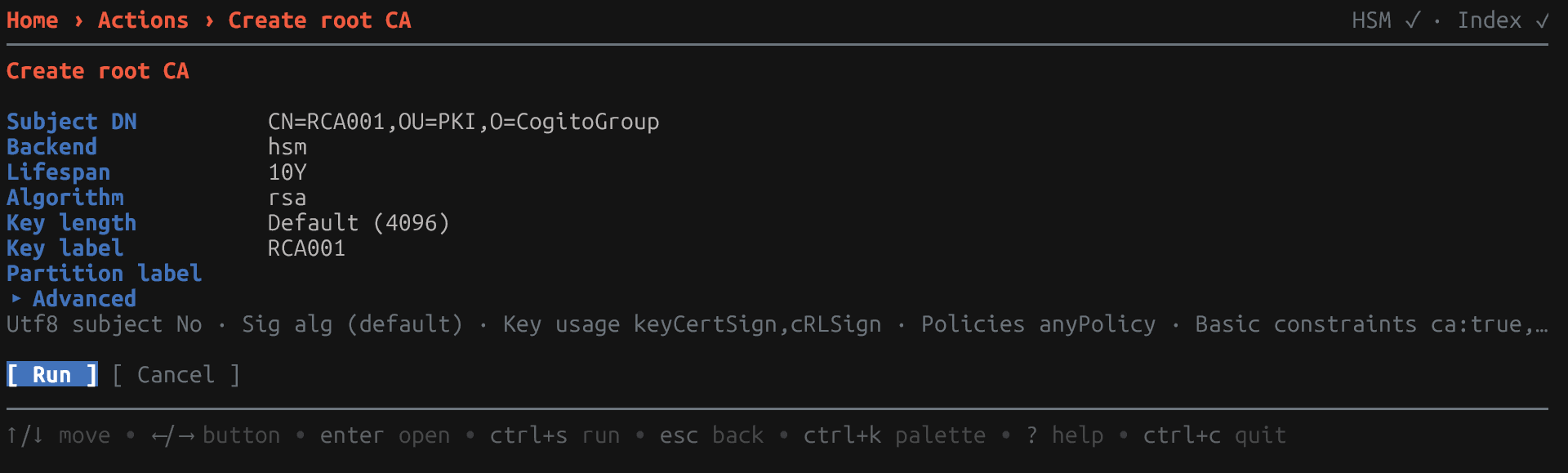
Root CAs are created under Actions, with RSA 4096 and a 10-year lifespan as defaults. Additional settings, including the CRL publication schedule used in Step 7, are available under Advanced. Subordinate CAs are created in the same way, and existing CAs can be imported.
CA type | Purpose | Created with |
|---|---|---|
Root CA | Self-signed trust anchor at the top of the hierarchy, often kept offline | Create root CA |
Policy CA | Sits below the root and applies certificate policy to the CAs beneath it | Create subordinate CA |
Issuing CA | Issues certificates to users, devices and services | Create subordinate CA |
CA key type | Key sizes and parameter sets | Default |
|---|---|---|
RSA | 2048, 3072, 4096, 8192 | 4096 |
ECDSA | 224, 256, 384, 521 | 384 |
ML-DSA (post-quantum) | 44, 65, 87 | 65 |
Step 6: Certificate issuance
Certificate templates are defined in the template editor, and certificates are issued under Actions. Each action opens a form and shows the equivalent CLI command. The console provides the full functionality of the CLI.
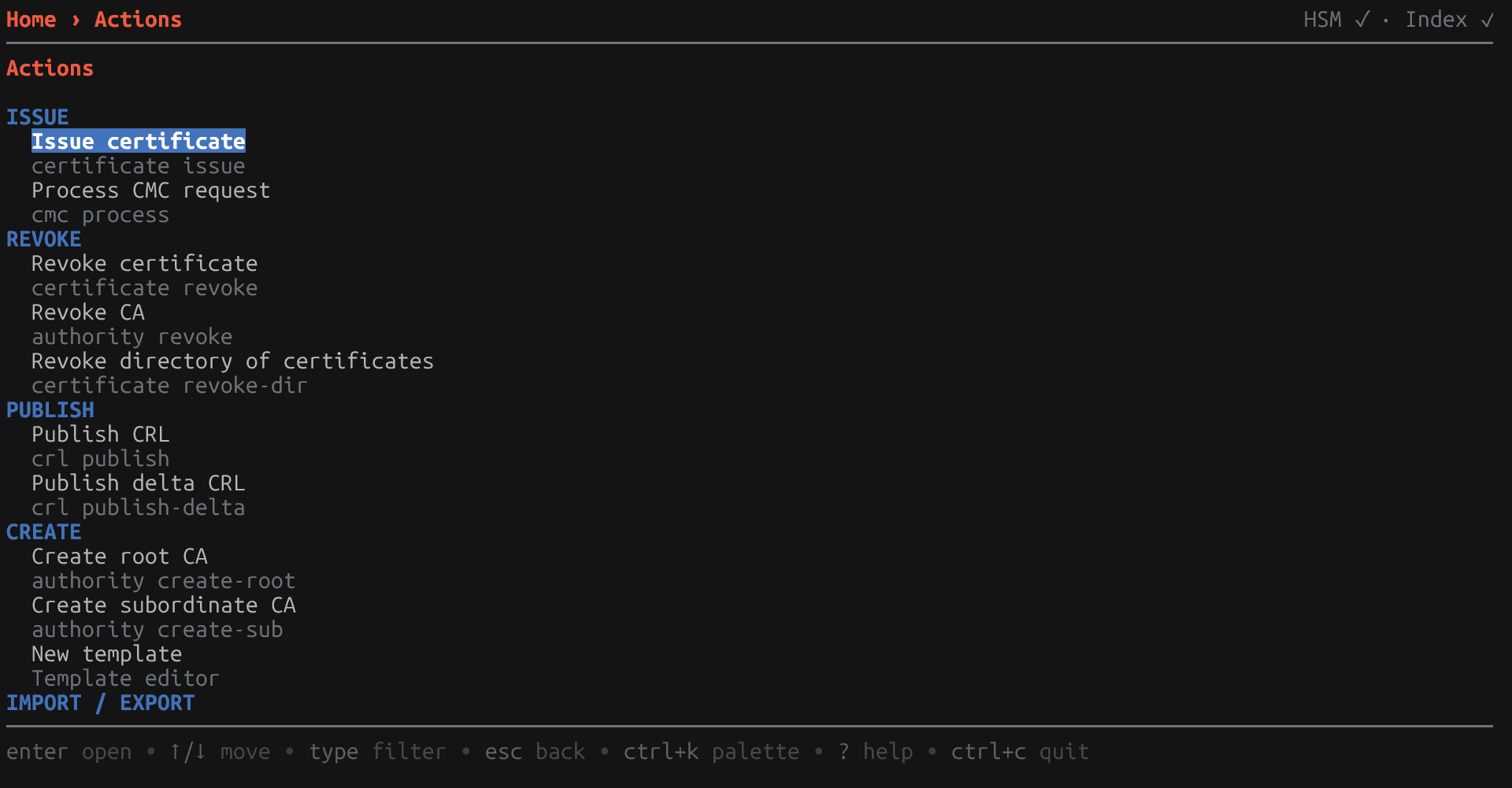
Discovery provides full-text search across all records, including by name such as subca or by status such as revoked. Certificates, requests and template changes are recorded in the audit trail.
Step 7: Automatic CRL publication
Set an output folder in the configuration file and start the service. Each CA then publishes its CRL to that folder on its configured schedule.
"crl_output_path": "/var/lib/jellyfish/crls"
jellyfish serve
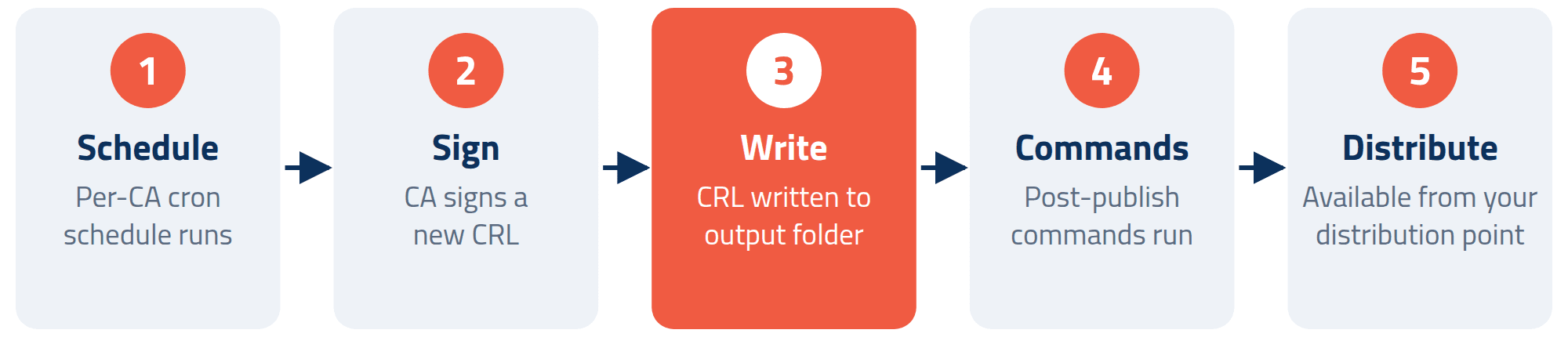
Commands defined in post_crl_publish_commands run after each publication, for example to copy files to a distribution point. Full and delta CRLs can also be published manually under Actions.
Step 8: Enrollment
Automated enrolment is provided through ACME on Linux and Windows deployments, and through autoenrolment on Windows deployments. When ACME is enabled in the configuration file, the service operates as a live RFC 8555 ACME server. Clients enrol and renew automatically under the configured CA and template.
"http": { "address": "0.0.0.0", "port": 443, "acme": { "ca": "ICA301", "template": "ACME-WebServer" } }
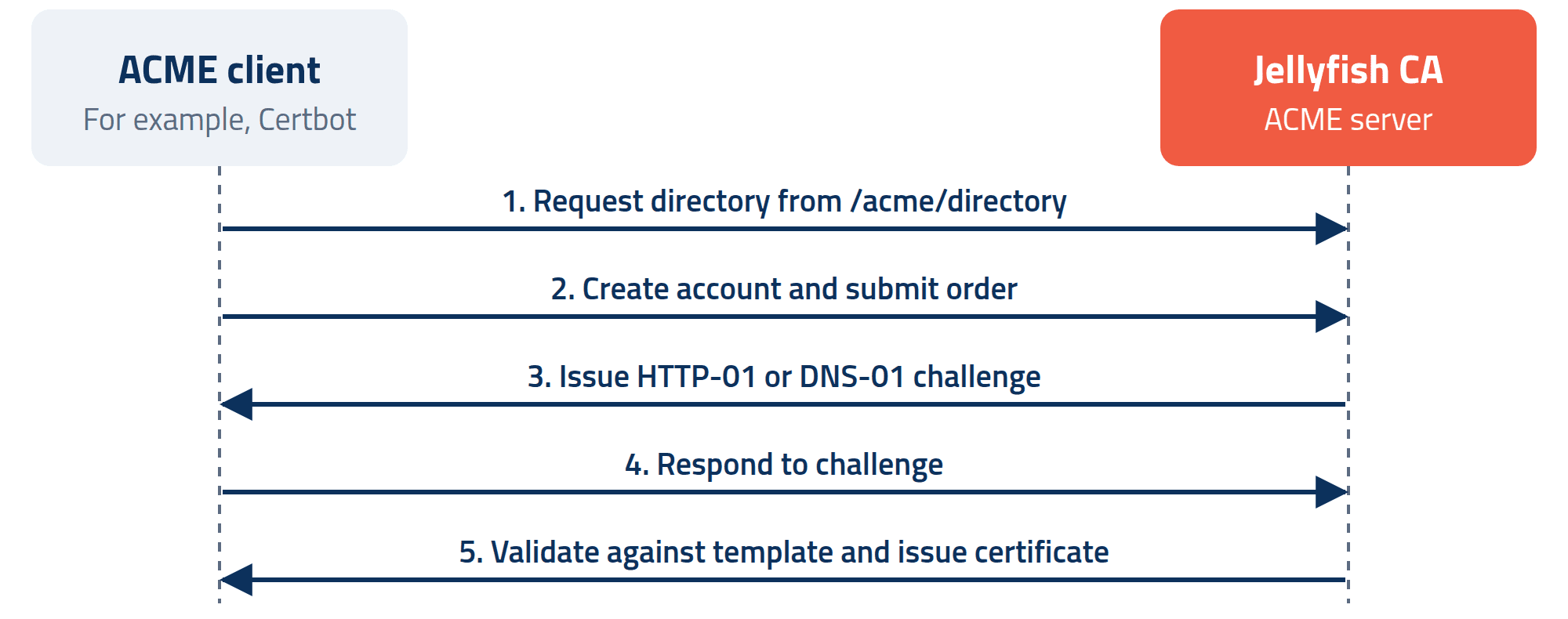
HTTP-01 and DNS-01 challenges are supported, with HTTP-01 covering domain names and IP addresses and DNS-01 covering domain names. Certbot and other ACME clients connect using the directory URL.
sudo certbot certonly --standalone --preferred-challenges http-01 \
--server https://<your-ca>/acme/directory -d www.example.com
On Windows deployments, Windows autoenrolment is also supported. Domain-joined computers and users enrol and renew automatically, with no ACME client or manual request needed.
Support for AD CEP/CES and SCEP is coming.
About Cogito Group
Cogito Group is an award-winning, Australian owned and operated ICT company, specialising in authentication, cloud security, identity management and data protection. Cogito Group protect the authentication methods used to access information through the use of Identity and other security technologies. Cogito Group protect data not only from unauthorised access and disclosure, but also from being altered by an unauthorised third party or a trusted insider with malicious intent. This assists in the detection and prevention of fraud or other malicious activities by third parties or trusted insiders.
Further information: Contact Cogito Group for more information on the Jellyfish Standalone Certificate Authority: www.cogitogroup.net