
Application Code Signing
Application Code Signing allows users to sign files either locally or through the cloud, ensuring their authenticity and integrity. For local signing, users can utilize the private key and certificate from an uploaded PKCS12 file, a USB token, or a smartcard. For cloud-based signing, the private key and certificate are securely stored within a Jellyfish Hardware Security Module (HSM). The digital signature generated through code signing acts as authentication, enabling others to verify the file's integrity and confirm that it has not been tampered with or modified by malicious actors.
Interface options
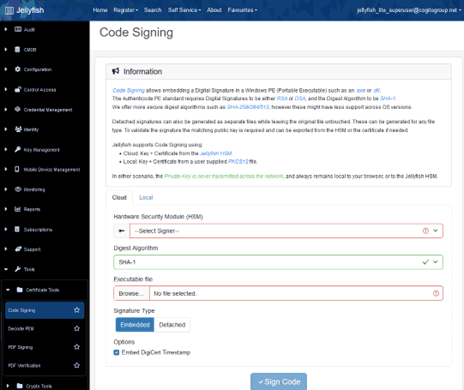
The Jellyfish Application Code Signing page simplifies the process of code-signing executables and other files. Jellyfish supports two signature types—Embedded and Detached—and offers four digest algorithm formats: SHA-1 (deprecated), SHA-256, SHA-384, and SHA-512.
The Embedded signature type is supported for Windows PE (Portable Executable) files, such as .exe or .dll files, as well as PowerShell scripts such as .ps1 files, allowing users to embed a digital signature directly within the file. The file is signed using the Windows code signing standard and can be verified by any Windows computer. Jellyfish also supports embedding a signed timestamp using the DigiCert timestamping service, ensuring that the code signature can be validated even after the original code-signing certificate has expired.
For code-signing files other than Windows executables or PowerShell scripts, you can generate a Detached signature instead of an embedded one. This method is suitable for Linux executables or any other files. Instead of embedding the signature directly into the original file, a separate signature file is created. You can then validate the code signature by comparing the signature file against the original file and the code-signing certificate.
Among the four digest algorithm formats, SHA-1 is the most widely supported across all operating systems and is mainly used for compatibility purposes, but it is not recommended due to security vulnerabilities. SHA-256, SHA-384, or SHA-512 provide stronger levels of security and are recommended instead.
Key Features of Code Signing
Authenticity:
- As the signature of the software is created using a private key that only the software author should have, a valid signature
Integrity:
- The signature is derived from a hash of the software data. As such, any modifications done to the software will cause the verification to fail, as the hash would no longer match the signature’s hash.
Non-Repudiation:
- The private key used to created the signature should only be owned by the author of the script. As such, the author cannot claim that the script was not signed by them if the certificate matches their private key.
Verification
A user can verify the authenticity of a code signed software by adding the author’s certificate into their certificate trust store, viewing the properties of the code signed software, selecting the “Digital Signatures” tab, selecting the signature, and viewing the details of the signature. A valid signature should say “This digital signature is OK”, while an invalid signature will provide a message stating the reason why the signature is invalid, such as the certificate being expired.
Certificate Trust Chain
Digital signatures use the standard Public Key Infrastructure (PKI) certificate trust chain to verify the legitimacy of the signature. A certificate authority is trusted by the client, and the author provides a signature containing a chain of certificates, with each authority vouching for the authenticity of the certificates below it until it reaches the certificate used by the author. As long as one of the certificates within the certificate chain is trusted by the client, the signature can be accepted as valid.
Code Signing Process
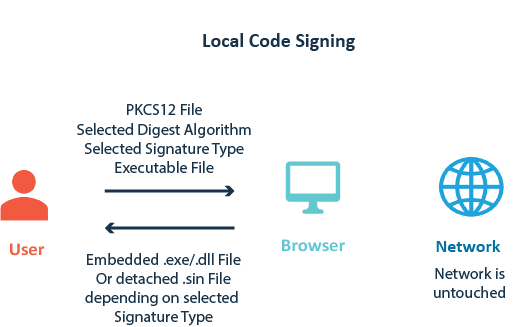
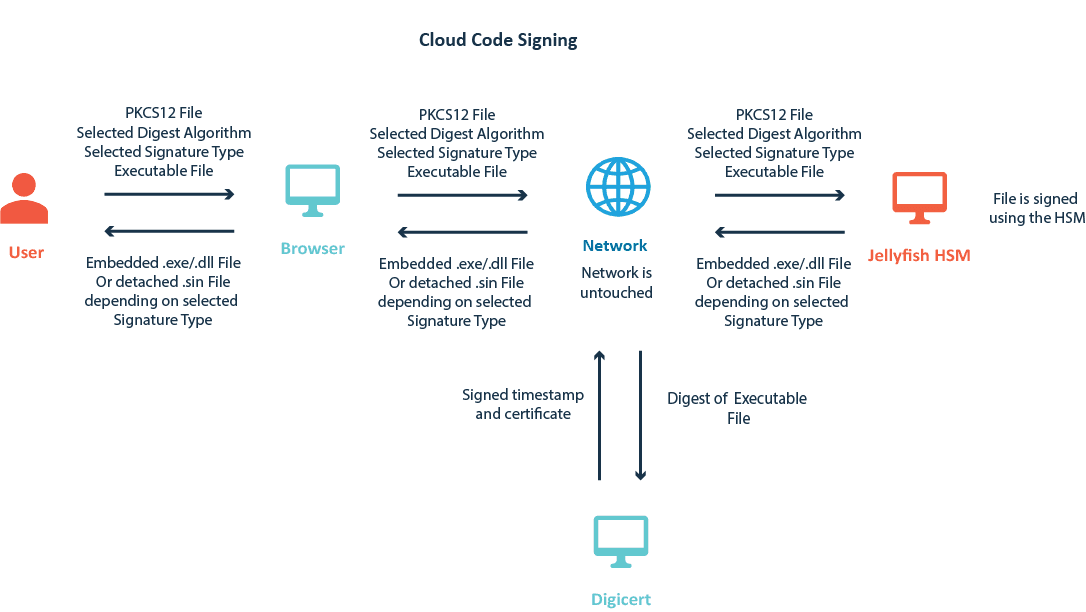
To safeguard data integrity, the private key used to sign the file is never transmitted across the network and always remains local to the user's browser or within the Jellyfish HSM.
When code-signing with a DigiCert timestamp, a cryptographic hash of the executable file is sent to DigiCert. The executable file itself never leaves your computer/browser and is not sent to Jellyfish or to DigiCert.
You can access Code Signing in Jellyfish by opening the "Tools" tab at the bottom of the sidebar, navigating to the "Certificate Tools" section, and clicking on "Code Signing."
Code Signing Automation
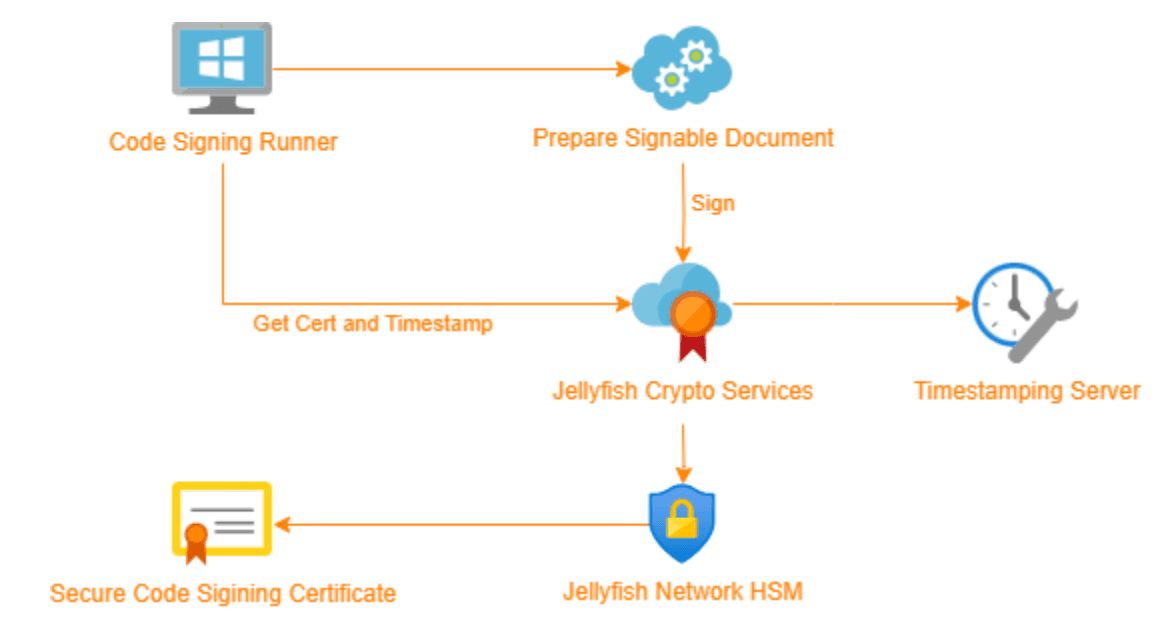
The Jellyfish code-signing API can be utilized to automate the code-signing process within CI/CD pipelines. It can be easily integrated into GitHub or GitLab to automatically code-sign release artifacts directly as part of the build process. Cogito Group uses this code-signing API internally for all Jellyfish releases, ensuring that customers can easily validate that their files have not been tampered with.
PowerShell Code Signing
A digital signature for a PowerShell script is generated in a similar manner to most other digital signatures. A hash of the data is created and signed using a provided private key. The certificate associated with the key is then distributed publicly so that other can verify the signature. There are however, key differences to the process.
Firstly, the contents of the script are converted to UTF-16 LE encoding to standardise the signing process. A PKCS7 “signed data” object is generated, and the script is then hashed and added to the digest section of the SPC indirect data’s content value. The content is then converted to BER format and hashed as well, using the same hashing algorithm as before, and placed in the signed attribute’s message digest. The entire signed attribute section is the converted to BER format and signed using the standard signing process. The appropriate digest algorithm OIDs are then added to the PKCS7, before the PKCS7 object is converted to a base64 string and appended to the end of the PowerShell script inside a signature block.
For an example of how to implement PowerShell code signing, see the repository below:
https://github.com/CogitoGroupDevTeam/powershell-code-signing