
What is Key Discovery?
Key Discovery identifies cryptographic keys within your environment and records information about them for continuous management and monitoring within the Jellyfish platform. It helps system administrators understand which keys exist, where and how they are used, and which devices or users they are being used by.
Discovered information includes the key’s fingerprint, algorithm, size, location of discovery and associated services where available. Combined with Certificate Discovery, it provides visibility into certificates and the keys they use.
Key Discovery supports the ongoing maintenance and management of an inventory of key metadata.
Key Benefits
The key benefits of Key Discovery include:
- Improved visibility: Identify keys and certificates that may be missing from existing inventories.
- Centralised searching: Find discovered keys and certificates through Jellyfish using their identifying information and technical properties.
- Clear associations: Understand what devices, users, and services are using which keys.
- Identification of key reuse: See where the same key is used across multiple devices or services.
- Support for security reviews: Find keys with algorithms or sizes that require assessment against organisational policy. Allowing for a better view of lifecycle planning and potential security concerns regarding key choices.
- Reduced manual investigation: Automatically brings discovery results and device/user associations together in one place, removing the need for manual discovery.
Discovery Methods
Jellyfish uses eight complementary discovery methods, each with different visibility. No single method sees everything, so all eight feed one connected inventory where discovered keys and certificates can be searched, monitored and managed together.
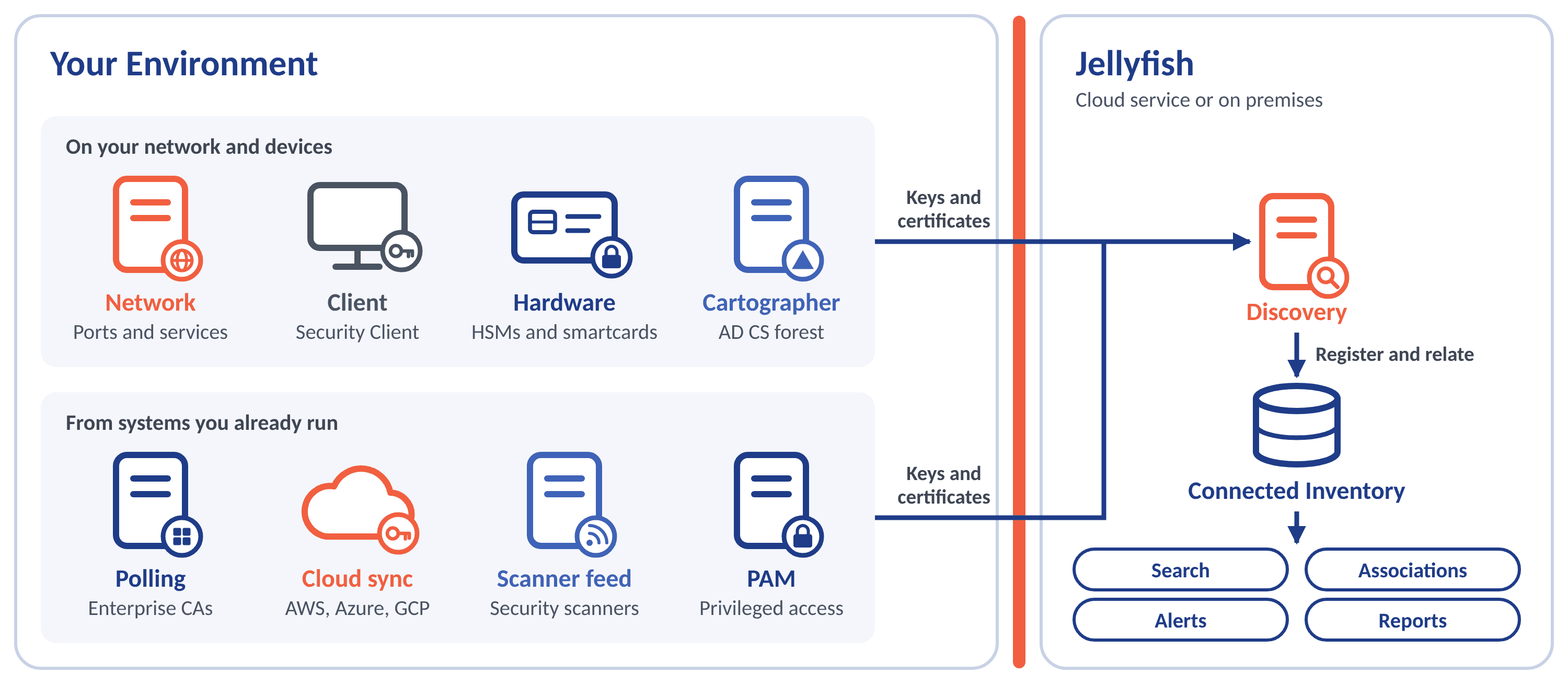
Figure 1 - Jellyfish Discovery Overview
On your network and devices
- Network: The easiest method to run. A Discovery Agent interrogates ports, services and network addresses to find the certificates and keys they present, with no installation on the devices being scanned. It cannot reach keys that are never presented on the network.
- Client: The Jellyfish Security Client, installed on a device, sees far more than a network scan, including secured keys in Windows machine certificate stores and Java keystores, SSH user keys and GPG/PGP keys. The trade-off is that it requires an installation.
- Hardware: Keys held on specialised hardware, such as Hardware Security Modules (HSMs), smartcards and FIDO tokens, need their own discovery method. This brings hardware-held keys into the same inventory as everything else.
- Cartographer: Imports the certificates identified by Jellyfish AD CS Cartographer, which scans an Active Directory forest and consolidates data from its Microsoft Certificate Authorities.
From systems you already run
- Polling: Loads all of the certificates a Certificate Authority holds from known points, such as your internal enterprise CAs, including AD CS, UniCERT, EJBCA and the Jellyfish CA.
- Cloud sync: Imports certificate and key data held in your cloud services, for example AWS, Azure Key Vault and GCP Certificate Manager.
- Scanner feed: Reuses the findings of security scanning products you already have. Coverage is partial, as some sources provide less complete information than direct discovery.
- PAM: Reads the keys associated with your Privileged Access Management (PAM) system, so privileged keys appear in the same inventory.
Network and Client discovery are described in more detail below.
Network Key Discovery
Network Key Discovery utilises a non-intrusive Discovery Agent to inspect services on configured network ranges and ports.
- Discovers public keys contained in certificates presented by TLS services, such as HTTPS.
- Discovers SSH public host keys used to identify SSH servers.
- Records Key attributes such as key fingerprints, algorithms, key sizes, and contextual data (network addresses, ports, and services)
- Groups repeated discoveries so the same key can be associated with multiple locations.
- Provides options for key discovery results to be exported as CSV at the location of the Discovery Agent, allowing for local discovery data storage.
Network discovery does not require any installation on client devices. Network Discovery is the least intrusive option for discovery that requires minimal configuration. Its coverage depends on network reachability and the information exposed by the services being scanned.
Client Key Discovery
Client Key Discovery uses the Jellyfish Security Client installed on a device to discover cryptographic keys that may not be visible through network discovery methods.
- Inspects supported local key stores and file locations, including SSH user keys, operating-system key stores, and GPG/PGP keys.
- Records key metadata, including the key type, fingerprint, algorithm, key size, and key associations.
- Reports discoveries to Jellyfish for centralised searching and review or at the discovery agent as CSV.
- Complements Network Key Discovery by identifying keys used locally by applications, users, and workstation machines.
Supporting Consultants and Key Transitions
Discovery is an invaluable tool for consultants. People bring the expertise to understand business systems, ownership and constraints. Discovery provides the evidence: a complete and current view of the keys and certificates in use and what depends on them.
This is especially valuable when assessing a client’s needs, and during key transitions such as the move to post-quantum cryptography (PQC) or from RSA 2048 to RSA 4096 bit keys.
- Evaluating client needs: A discovery run early in an engagement shows the size and make-up of a client’s cryptographic estate, so consultants can scope the work and recommend an approach based on evidence rather than estimates.
- Finding what is in scope: Search by algorithm and key size to find every key a transition affects, such as every RSA key smaller than 4096 bits, or every RSA and ECC key that will need to move to PQC.
- Understanding impact: Associations show the devices, users and services that rely on each key, and every place a key is reused, so consultants can answer “what breaks if we replace this key?” before making a change.
- Prioritising the work: Algorithm, key size and exposure for each key help consultants and system owners agree which systems to transition first.
- Engaging the right people: Each key can be related to an owner, so consultants know who to work with on each change.
- Tracking progress: Ongoing discovery shows what has been replaced and what remains, so progress against the transition plan can be measured and reported.
Consultants bring the judgement. Discovery provides the evidence.
Deployment Options
Deployment varies slightly depending on which of the eight discovery methods are in use, but generally takes one of three forms.
- Cloud service: The Jellyfish cloud service gathers keys and certificates from your on-premises environment and from your other cloud platforms.
- Pros: The easiest deployment, and the most feature rich.
- Cons: Discovery information is held in the cloud.
- Full software on premises: The full Jellyfish software is installed in your own environment. It can gather keys and certificates both on premises and in the cloud.
- Pros: Still feature rich, but no information goes to the cloud.
- Cons: A more complex and costly on-premises deployment.
- Discovery components on premises: A cut-down installation runs only the discovery components in your environment and provides the results as a CSV file.
- Pros: No loss of information, as all results stay in your environment. Simpler to install and configure.
- Cons: Cannot reach external clouds and works with only some of the Cognectors. You need to bring your own tools to analyse the results.
About Cogito Group
Cogito Group is an award-winning, Australian owned and operated ICT company, specialising in authentication, cloud security, identity management and data protection. Cogito Group protect the authentication methods used to access information through the use of Identity and other security technologies. Cogito Group protect data not only from unauthorised access and disclosure, but also from being altered by an unauthorised third party or a trusted insider with malicious intent. This assists in the detection and prevention of fraud or other malicious activities by third parties or trusted insiders.