Connection Hub
Jellyfish Connection Hub is a federation capability within the Jellyfish platform that enables secure, managed connectivity between geographically distributed Jellyfish instances. It extends the Jellyfish Identity Brokerage capabilities by allowing organisations to not just interconnect with separate applications, but with other instances of Jellyfish too. It can establish direct or federated trust relationships, share resources such as credentials, certificate authorities, certificates, smart cards, devices, and users across instance boundaries. Jellyfish Connection Hub allows an organisation or organisations to share and govern cross-instance access through a unified control plane.
Alongside Connection Hub, Jellyfish introduces Roles v3.0 a unified role-based access control model that replaces multi-scope permissions with a single set of access controls designed specifically for federated environments. This directly integrates with billing and subscription services to facilitate fully self-managed governance.
Common use cases can be the sharing of access control tokens to allow a user from one organisation to access a building of another organisation with a single card or for one system to provide certificates to a separate system producing smart cards for instance.
Multi-Instance Federation
Jellyfish Connection Hub provides a management interface for connecting and federating multiple Jellyfish instances. Administrators establish trust relationships, manage connection lifecycles, control resource sharing, and handle incoming connection requests through an approval workflow.
Connection Model
Direct Connections
- Cryptographically secure peer-to-peer trust between two Jellyfish instances.
Centralised Connections
- Trust delegation via a master node, enabling access without direct connection.
Connection Lifecycle
- Managed connection states with full administrator control on both ends.
Approval Workflow
- High level workflow simplifying federated setup between instances.
Shared Resources
Each connection has independent, granular sharing controls. Resources are shared at the entity level, allowing administrators to expose specific items without granting blanket access.
Type | Shared Resources |
Certificate Authorities | Root, Policy, Issuing CAs |
Templates | User, Device, Web Server, VPN, Code Signing, etc. |
Users | Federated user identity sharing for cross-instance authentication and access. |
Smart Cards | Certificate + User + Location |
Network Topology
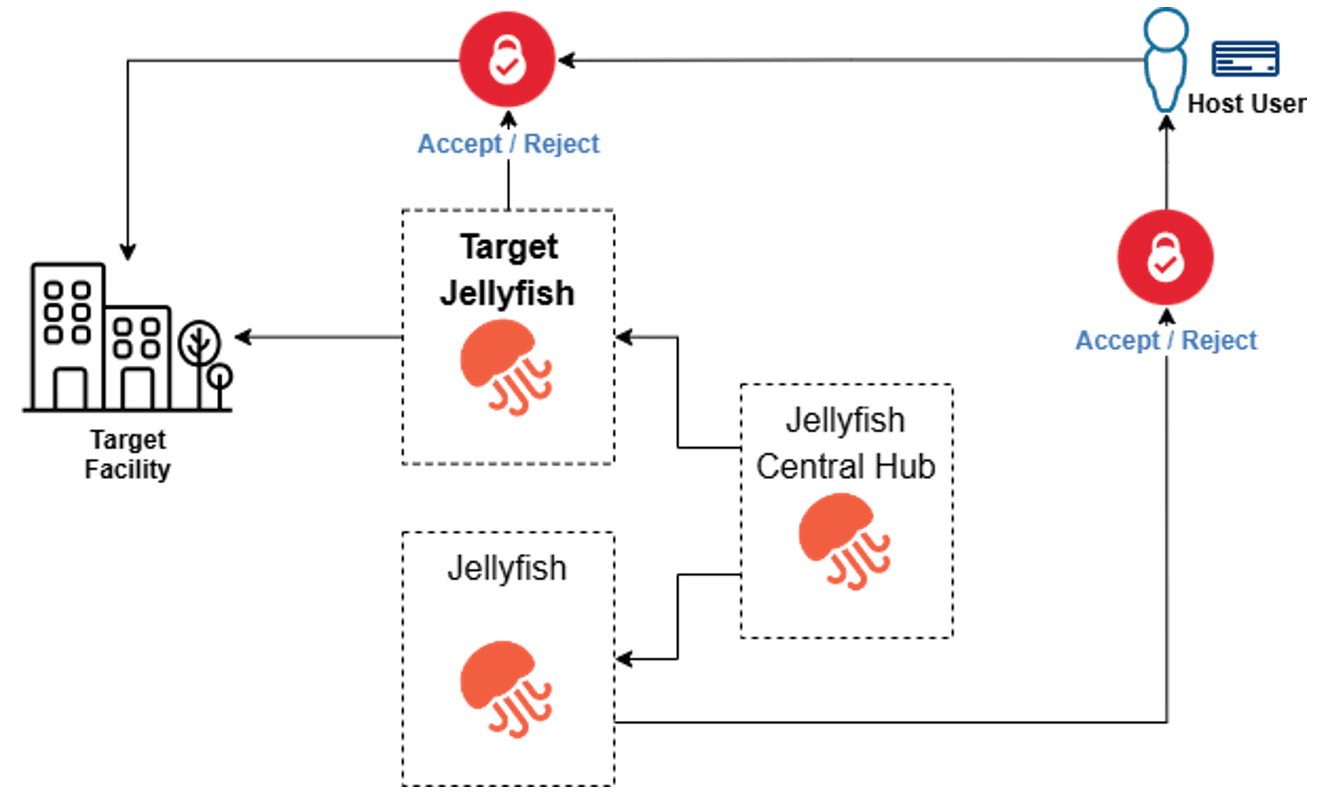
Connection Hub network topology can be set up as bilateral connections between organisations or an instance acting as a one to many or central capability as shown below. In this instance the central hub enables controlled access facility access to users in belonging to different organisations and Jellyfish installations.
Streamlined Access Control
Jellyfish Roles v3.0 replace the multi-scope permission model with a unified role-based access control. It delivers a single set of permissions that governs access across inside and outside the platform, including federated Hub connections, eliminating the complexity of managing separate scope levels for External, Jellyfish, Tenancy, Organisation and User contexts.
Key Improvements
Single Permission Set
- One unified set of role permissions replaces the previous four-scope model.
Permissions are defined once and apply consistently across all contexts.
Hub-Aware Roles
- Natively support cross-instance access governance. Roles define what resources a federated user can access when connecting via Connection Hub.
Simplified Administration
- Administrators configure a single permission matrix covering 21 resource categories and their associated actions.
Hierarchical Access Tree
- An interactive tree with cascading checkboxes defines which organisational nodes a role can access.
Backwards Compatible
- Existing role assignments are automatically migrated to model with equivalent effective permissions.
Permission Matrix
The permission matrix presents all 21 resource categories as rows and available actions as columns. Each resource has multiple action of which each has a Allow and Deny toggle. Roles also define user assignments and access tree scope.
Resource Categories
|
|
Use Cases
Below are some common example use cases.
Example 1: Shared Physical and Logical Access Control
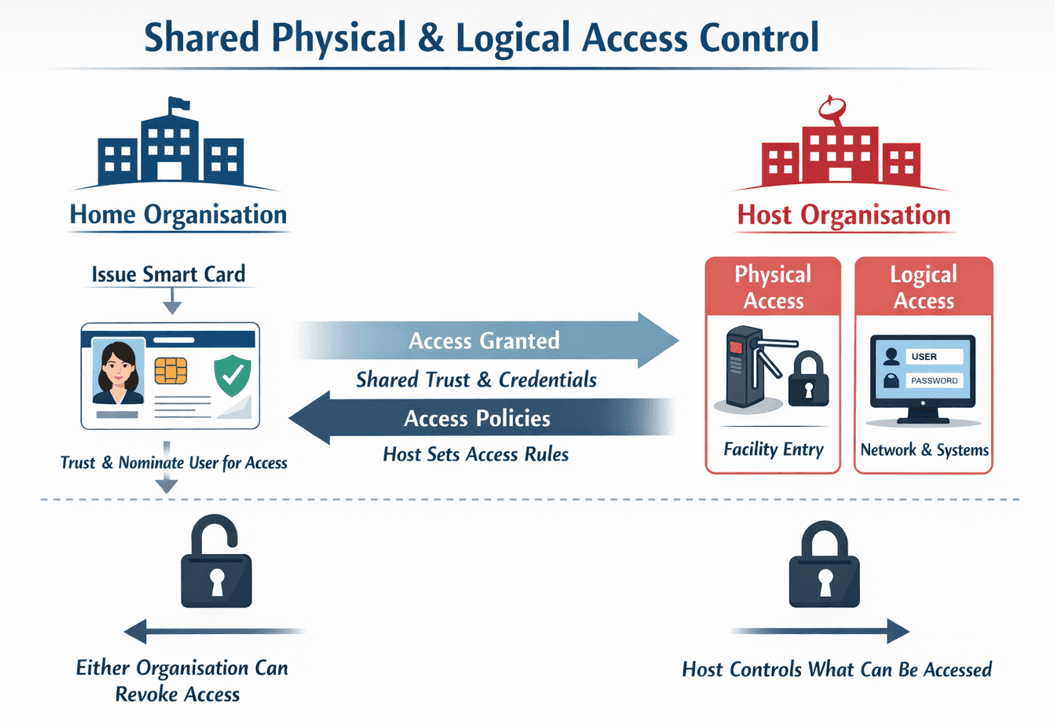
This example demonstrates the ability of the system to share access control services. A host or access granting organisation can trust a credential (such as a card) issued by another (trusted home organisation). A users home organisation smartcard can be used for access in both organisations. In this instance, both organisations can maintain control over access of their respective organisations. The user home organisation that provides the credential can nominate the user for access to the host organisations sites, services or environments. The host organisation, whose resources will be utilised can set what resources can be accessed. Only the host organisation can change what is accessible, but either organisation can revoke all rights at any time. A key difference between this an systems hosted by the US Federal Government in the Physical Access Control space is that it extends to logical access as well, and does not require a token to be presented for the access to be granted.
Example 2: Resource Usage
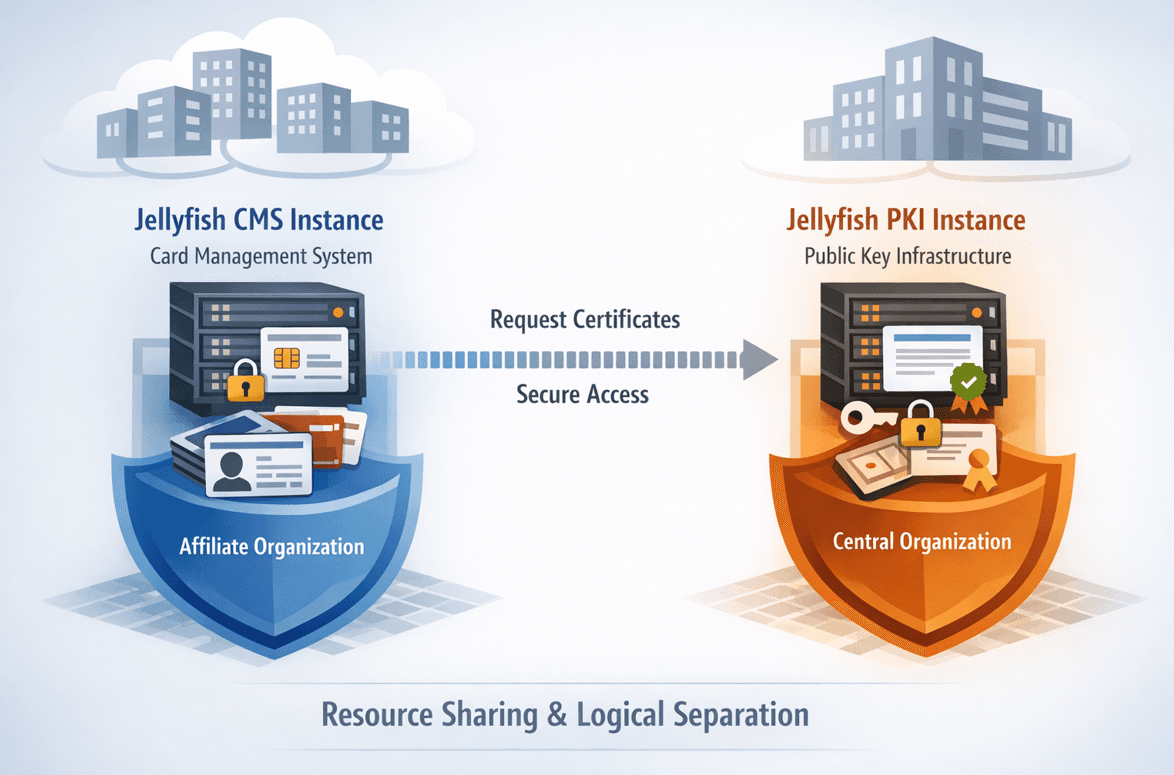
Another example is allowing one instance of Jellyfish to utilise the resources of another Jellyfish instance such as a Jellyfish Card Management System instance obtaining certificates from a Jellyfish PKI instance. This allows different levels of logical control or separation between environments for security reasons or even the provision of centralised services from one organisation to other affiliate organisations.