
What is a Card Management System?
A Card Management System (CMS)—often called Credential Management Software—acts as the operational control plane for your authentication credentials.
It centralises and automates the lifecycle of physical and virtual authenticators, including:
- Cards and USB tokens
- Hardware security keys and secure elements
- FIDO2 authenticators (where applicable)
- PKI-backed certificates and related metadata
By integrating with identity directories and Certificate Authorities (PKI/CA), an SCMS replaces ad hoc, error-prone processes with governed workflows for:
- High-volume issuance (including batch operations)
- PIN setup, change, and unblock processes
- Certificate renewal and replacement
- Status control (active/inactive/locked)
- Revocation and offboarding controls
- End-of-life handling, reuse, and audit traceability
The result: every credential is accounted for, consistently configured, and manageable from issuance through to retirement—with clear logs to support audits and investigations.
Credential Lifecycle Stages
Jellyfish enables a structured lifecycle so that each credential moves through predictable states with appropriate controls, approvals, and logging.
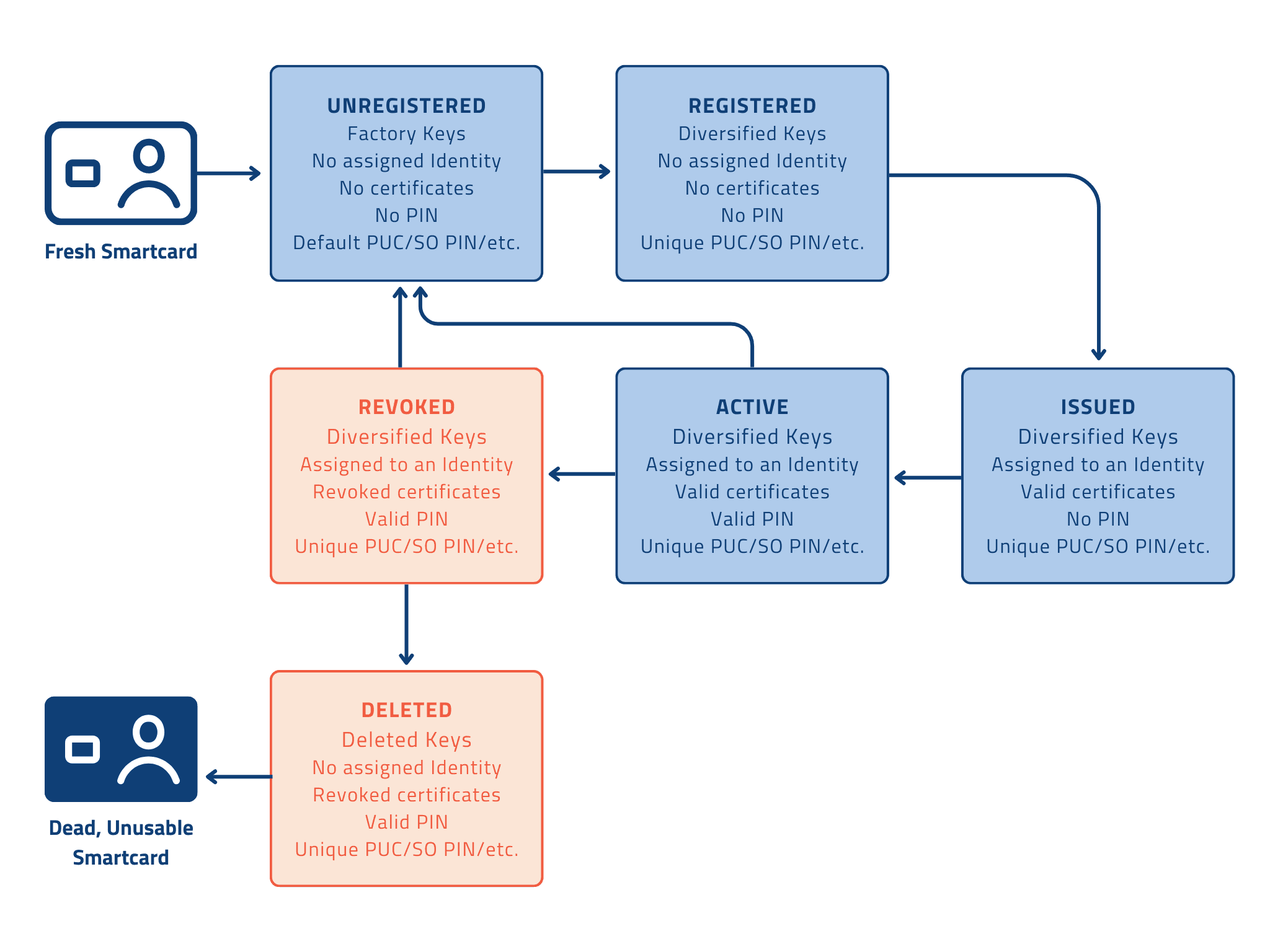
- Registration - Secure onboarding and root of trust.
New credentials are brought under management and hardened for operational control. This stage establishes trusted administrative access (for example, replacing default vendor settings/keys with organisation-controlled administrative keys where applicable), ensuring only authorised operators can manage the credential.
- Issuance - Policy-based provisioning.
A credential is provisioned for a user (or device/service identity) using predefined templates and policies. This may include certificate enrolment, profile configuration, and identity binding. Supports both individual issuance and batch rollout for larger deployments.
- Activation - User enablement with flexible workflows.
A provisioned credential becomes usable for authentication. Activation can be handled in multiple ways depending on operating model:
- Admin-led activation: immediate enablement by an authorised operator
- User self-service activation: controlled workflows for PIN setup or initial activation to reduce IT dependency
- Inactive - Temporary suspension without permanent teardown.
Used when a credential is temporarily non-compliant, misplaced, or awaiting investigation. Access is effectively paused while retaining the option to restore the credential if it is recovered or the issue is resolved.
- Locked - Security response and recovery path.
Triggered when a user exceeds allowed PIN attempts or a lock is applied for security reasons. The credential is prevented from being used, while approved helpdesk workflows can support secure unlock/unblock processes to restore access.
- Revocation - Immediate termination of trust.
For lost/stolen credentials, compromised tokens, or employee departures, revocation invalidates certificates and terminates trust with the CA/PKI. This is your “kill switch” to prevent further authentication using that credential.
- Retirement - Secure wipe and reuse to reduce cost and waste.
Retirement removes user-specific materials (certificates, keys, personal data) while keeping the device in inventory for reassignment. This supports sustainable operations and better hardware ROI.
- Deletion - End of operational record, with audit continuity.
The credential is removed from the active inventory and associated licensing can be released (where applicable). Transaction history and administrative logs remain available for audit and compliance purposes, even after the credential is no longer active.